 dependabot[bot]
e0623042f5
Bumps the react group with 2 updates: [react-i18next](https://github.com/i18next/react-i18next) and [react-resizable-panels](https://github.com/bvaughn/react-resizable-panels). Updates `react-i18next` from 17.1.12 to 17.1.13 <details> <summary>Changelog</summary> <p><em>Sourced from <a href="https://github.com/i18next/react-i18next/blob/master/CHANGELOG.md">react-i18next's changelog</a>.</em></p> <blockquote> <h2>17.1.13</h2> <ul> <li>fix(types): the <code>react</code> init options keep their types with i18next 27. i18next 27 declares <code>ReactOptions</code> (the type of <code>i18next.init({ react })</code>) as an empty interface and leaves its shape to react-i18next, so with react-i18next 17 the <code>react</code> options were no longer checked and <code>getDefaults().useSuspense</code> did not compile. react-i18next now declares them itself, with exactly the types i18next 26 has: TypeScript accepts the repeated declaration on i18next 26, and on i18next 27 it fills in the empty interface. Nothing changes with i18next 26.</li> </ul> </blockquote> </details> <details> <summary>Commits</summary> <ul> <li><a href="https://github.com/i18next/react-i18next/commit/76c1842830065a3a70d447d104056bfa2d4e4dd5"><code>76c1842</code></a> 17.1.13</li> <li><a href="https://github.com/i18next/react-i18next/commit/4dd03fe4c15bba58db4245214638a5de2619aacc"><code>4dd03fe</code></a> changelog for 17.1.13</li> <li><a href="https://github.com/i18next/react-i18next/commit/2d792a47a09b18f832d447585049d7a70cb60086"><code>2d792a4</code></a> fix(types): the react init options keep their types with i18next 27</li> <li><a href="https://github.com/i18next/react-i18next/commit/a6b635dfb482c212672fef8061bd3282ac3ba0bd"><code>a6b635d</code></a> chore: update dependencies and examples, close the dependabot alerts</li> <li><a href="https://github.com/i18next/react-i18next/commit/cbac86f3c2682c2db164dea1e131ab3448b218d7"><code>cbac86f</code></a> README: drop the Locize ad image; the sponsor banner and the text saying who ...</li> <li>See full diff in <a href="https://github.com/i18next/react-i18next/compare/v17.1.12...v17.1.13">compare view</a></li> </ul> </details> <br /> Updates `react-resizable-panels` from 4.17.0 to 4.18.1 <details> <summary>Release notes</summary> <p><em>Sourced from <a href="https://github.com/bvaughn/react-resizable-panels/releases">react-resizable-panels's releases</a>.</em></p> <blockquote> <h2>4.18.1</h2> <ul> <li>Fix the free space in a <code>Workspace</code> tabset's tab list (returned by <code>useTabListFreeSpace</code> and <code>getTabListFreeSpace</code>, reported to <code>subscribeToTabListFreeSpace</code> listeners, and set as the <code>--tab-list-free-space</code> custom property) not changing once the tab list is squeezed to 0px, e.g. beside a toolbar that doesn't shrink. It now keeps going down as the header's content overflows the header, and is updated when the header or its toolbar changes size.</li> <li>Fix <code>Workspace</code> interactions in right-to-left layouts (e.g. within <code>dir="rtl"</code>): dragging a tab within its tab list inserts it where it's dropped, arrow keys move focus to the tab on that side (<code>ArrowLeft</code> moves to the next tab), and dropping a tab or tabset onto the left or right edge of a tabset puts it on that side of the screen. The <code>left</code> and <code>right</code> regions passed to <code>moveTab</code> and <code>moveTabset</code> are sides of the screen too. A tab list's <code>data-overflow-start</code> and <code>data-overflow-end</code> attributes are also set correctly while it's scrolled. - <a href="https://redirect.github.com/bvaughn/react-resizable-panels/issues/791">#791</a></li> </ul> <h2>4.18.0</h2> <ul> <li>Add the <code>normalizeWorkspaceModel</code> function, which checks and tidies a model the same way the <code>defaultModel</code> prop does (e.g. removing empty tabsets and fixing selections), and returns <code>null</code> if the value isn't a model (e.g. corrupt saved data). Its <code>mapTab</code> option replaces each saved tab with the app's current version (or removes it, by returning <code>null</code>), so layouts saved by older versions of an app can be restored.</li> <li>Add the free space in each tabset's tab list (the space its tabs don't use; negative once they overflow), e.g. for a toolbar that moves items into an overflow menu when the header runs out of room. It's returned by the new <code>useTabListFreeSpace</code> hook and <code>getTabListFreeSpace</code> imperative method, reported to listeners added with the new <code>subscribeToTabListFreeSpace</code> method (e.g. from a toolbar rendered outside of the Workspace), and set as the tab list's <code>--tab-list-free-space</code> custom property. All of them are updated before the browser paints.</li> <li>Fix <code>Workspace</code> tabsets being shown at their collapsed sizes with their content still rendered (and reported as expanded by <code>useParentTabsetState</code>) when the model's sizes don't fit the tabsets' minimum sizes, e.g. a model saved in a wider window, a workspace that's made narrower, or <code>expandTabset</code> shrinking a sibling below its minimum. Tabsets are now shown within their minimum and maximum sizes (rather than collapsed, when there's room), and tabsets that still have to be collapsed to fit are shown (and reported) as collapsed; the new <code>isCollapsedToFit</code> value (returned by <code>useParentTabsetState</code>) tells them apart from tabsets collapsed in the model (e.g. to hide an "expand" button, since they can't be expanded until they fit). The model isn't changed, so the tabsets are shown as the model has them again once they fit.</li> <li>Add <code>maxWidth</code> and <code>maxHeight</code> to <code>Workspace</code> tabsets (and <code>updateTabset</code>), which limit how large a tabset's content area can be resized (e.g. a sidebar that can only grow so wide). Like minimum sizes, they must use absolute units. A maximum only applies if something else can take up the rest of its split (e.g. another tabset without a maximum); otherwise it's ignored, with a warning in development.</li> <li>The default <code>Workspace</code> tabset drag preview now shows the number of other tabs being dragged after the selected tab's title (e.g. "One (+2)"). Tabsets with one tab, and workspaces with a <code>renderDragPreview</code> or <code>renderTabsetDragPreview</code> prop, show the same preview as before. - <a href="https://redirect.github.com/bvaughn/react-resizable-panels/pull/789">#789</a></li> </ul> </blockquote> </details> <details> <summary>Changelog</summary> <p><em>Sourced from <a href="https://github.com/bvaughn/react-resizable-panels/blob/main/CHANGELOG.md">react-resizable-panels's changelog</a>.</em></p> <blockquote> <h2>4.18.1</h2> <ul> <li>Fix the free space in a <code>Workspace</code> tab list not going down once the tab list is squeezed to 0px.</li> <li>Fix <code>Workspace</code> interactions in right-to-left layouts (dragging tabs within tab lists, arrow keys, and the left and right drop regions). - <a href="https://redirect.github.com/bvaughn/react-resizable-panels/issues/791">#791</a></li> </ul> <h2>4.18.0</h2> <ul> <li>Add <code>normalizeWorkspaceModel</code>, which checks and tidies a saved model (returning <code>null</code> if it isn't valid); its <code>mapTab</code> option updates saved tabs.</li> <li>Add the free space in each <code>Workspace</code> tab list (e.g. for an overflow menu): the <code>useTabListFreeSpace</code> hook, the <code>getTabListFreeSpace</code> and <code>subscribeToTabListFreeSpace</code> methods, and the <code>--tab-list-free-space</code> custom property.</li> <li>Add <code>maxWidth</code> and <code>maxHeight</code> to <code>Workspace</code> tabsets.</li> <li>Fix <code>Workspace</code> tabsets that don't fit their minimum sizes being shown collapsed with their content still rendered. They're now collapsed to fit (see <code>useParentTabsetState().isCollapsedToFit</code>) without changing the model.</li> <li>The default tabset drag preview shows how many other tabs are being dragged (e.g. "One (+2)"). - <a href="https://redirect.github.com/bvaughn/react-resizable-panels/pull/789">#789</a></li> </ul> </blockquote> </details> <details> <summary>Commits</summary> <ul> <li><a href="https://github.com/bvaughn/react-resizable-panels/commit/4721fbe5e8b1804ee24b3bef9d1f6b9dc1a93879"><code>4721fbe</code></a> Improve RTL for Workspace</li> <li><a href="https://github.com/bvaughn/react-resizable-panels/commit/d7817d72a6749fd9ccd23c0288c632975e5ba190"><code>d7817d7</code></a> Pending 4.18.1 change set</li> <li><a href="https://github.com/bvaughn/react-resizable-panels/commit/c97acaddb08508322ad557061e0d6186302d74c1"><code>c97acad</code></a> 4.17.0 -> 4.18.0</li> <li><a href="https://github.com/bvaughn/react-resizable-panels/commit/e050cc64d79ddee1feb521fe2914c0da55b7b74a"><code>e050cc6</code></a> 4.18.0 (<a href="https://redirect.github.com/bvaughn/react-resizable-panels/issues/790">#790</a>)</li> <li>See full diff in <a href="https://github.com/bvaughn/react-resizable-panels/compare/4.17.0...4.18.1">compare view</a></li> </ul> </details> <br /> Dependabot will resolve any conflicts with this PR as long as you don't alter it yourself. You can also trigger a rebase manually by commenting `@dependabot rebase`. [//]: # (dependabot-automerge-start) [//]: # (dependabot-automerge-end) --- <details> <summary>Dependabot commands and options</summary> <br /> You can trigger Dependabot actions by commenting on this PR: - `@dependabot rebase` will rebase this PR - `@dependabot recreate` will recreate this PR, overwriting any edits that have been made to it - `@dependabot show <dependency name> ignore conditions` will show all of the ignore conditions of the specified dependency - `@dependabot ignore <dependency name> major version` will close this group update PR and stop Dependabot creating any more for the specific dependency's major version (unless you unignore this specific dependency's major version or upgrade to it yourself) - `@dependabot ignore <dependency name> minor version` will close this group update PR and stop Dependabot creating any more for the specific dependency's minor version (unless you unignore this specific dependency's minor version or upgrade to it yourself) - `@dependabot ignore <dependency name>` will close this group update PR and stop Dependabot creating any more for the specific dependency (unless you unignore this specific dependency or upgrade to it yourself) - `@dependabot unignore <dependency name>` will remove all of the ignore conditions of the specified dependency - `@dependabot unignore <dependency name> <ignore condition>` will remove the ignore condition of the specified dependency and ignore conditions </details> Signed-off-by: dependabot[bot] <support@github.com> Co-authored-by: dependabot[bot] <49699333+dependabot[bot]@users.noreply.github.com>

Maputnik


A free and open visual editor for the MapLibre GL styles targeted at developers and map designers.
Usage
- 🔗 Design your maps online at https://www.maplibre.org/maputnik/ (all in local storage)
- 🔗 Use the Maputnik CLI for local style development
- In a Docker, run this command and browse to http://localhost:8888, Ctrl+C to stop the server.
docker run -it --rm -p 8888:8000 ghcr.io/maplibre/maputnik:main
To see the CLI options (for example file watching or style serving) run:
docker run -it --rm -p 8888:8000 ghcr.io/maplibre/maputnik:main --help
You might need to mount a volume (-v) to be able to use these options.
Documentation
The documentation can be found in the Wiki. You are welcome to collaborate!
- 🔗 Study the Maputnik Wiki
- 📹 Design a map from Scratch https://youtu.be/XoDh0gEnBQo
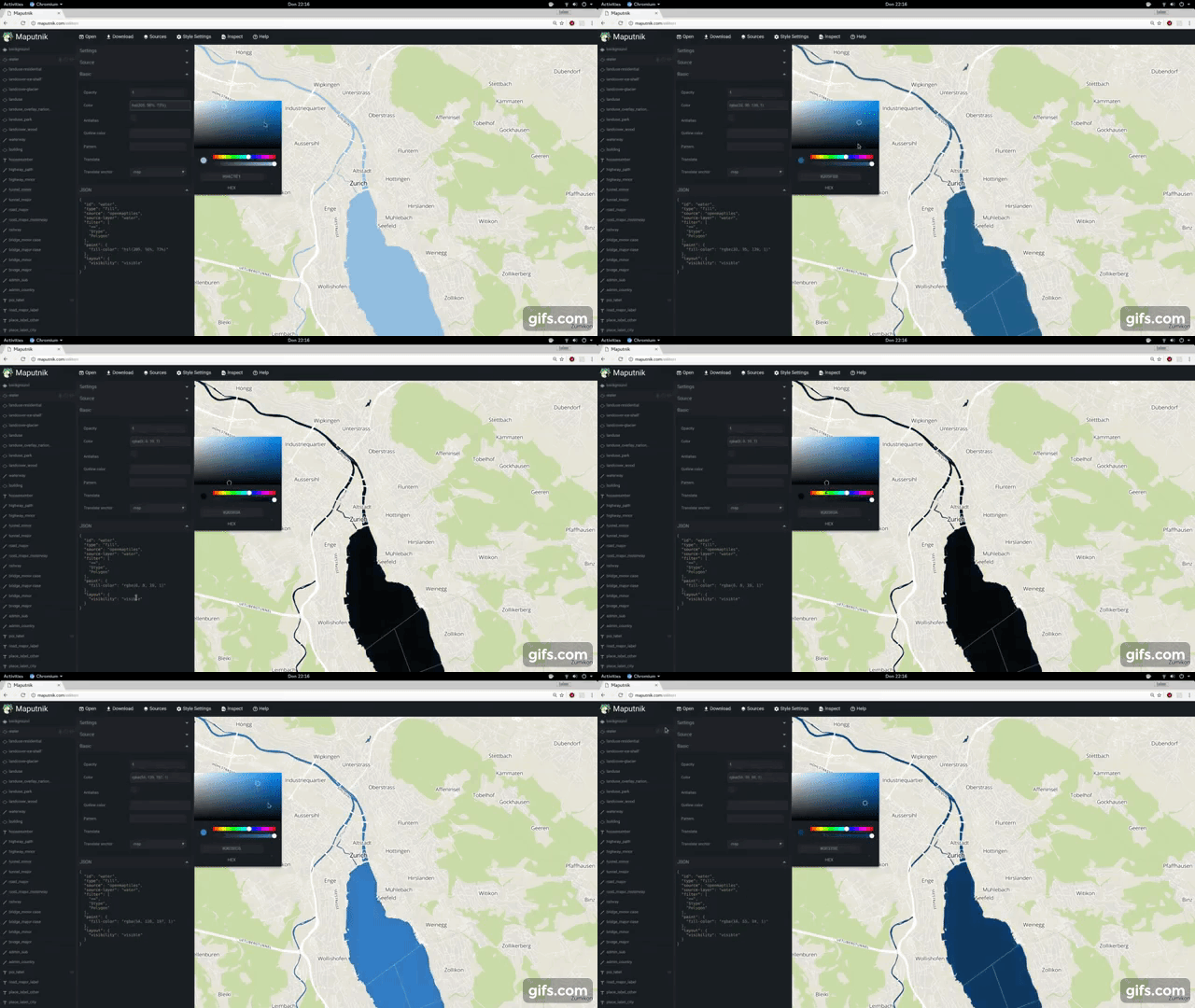
Develop
Maputnik is written in typescript and is using React and MapLibre GL JS.
We ensure building and developing Maputnik works with the current active LTS Node.js version and above.
Check out our Internationalization guide for UI text related changes.
Getting Involved
Join the #maplibre or #maputnik slack channel at OSMUS: get an invite at https://slack.openstreetmap.us/ Read the the below guide in order to get familiar with how we do things around here.
Install the deps, start the dev server and open the web browser on http://localhost:8888/.
# install dependencies
npm install
# start dev server
npm run start
If you want Maputnik to be accessible externally use the --host option:
# start externally accessible dev server
npm run start -- --host 0.0.0.0
The build process will watch for changes to the filesystem, rebuild and autoreload the editor.
npm run build
Lint the JavaScript code.
# run linter
npm run lint
npm run lint-css
npm run sort-styles
Tests
End-to-end tests
For E2E testing we use Playwright. The tests live in the e2e directory and drive the app through the MaputnikDriver page object.
The first time you run the tests, install the browser:
npx playwright install chromium
Playwright automatically starts the dev server (npm run start) for you, so you can just run:
npm run test
Some useful options:
# see the tests run in a headed browser
npm run test -- --headed

# run a single spec / filter by title
npm run test -- e2e/map.spec.ts
npm run test -- -g "zoom level"

# open the interactive UI mode
npx playwright test --ui
Running the E2E tests also produces a code-coverage report in coverage/ (collected via istanbul instrumentation of the dev server).
Unit & component tests
Unit tests and component tests run with Vitest; component tests (*.browser.test.tsx) use Vitest's browser mode with the Playwright provider.
npm run test-unit
Release process
- Review
CHANGELOG.md- Double-check that all changes included in the release are appropriately documented.
- To-be-released changes should be under the "main" header.
- Commit any final changes to the changelog.
- Run Create bump version PR by manual workflow dispatch and set the version number in the input. This will create a PR that changes the changelog and
package.jsonfile to review and merge. - Once merged, an automatic process will kick in and creates a GitHub release and uploads release assets.
Sponsors
Thanks to the supporters of the Kickstarter campaign. This project would not be possible without these commercial and individual sponsors. You can see this file's history for previous sponsors of the original Maputnik repo. Read more about the MapLibre Sponsorship Program at https://maplibre.org/sponsors/.
License
Maputnik is licensed under MIT and is Copyright (c) Lukas Martinelli and Maplibre contributors. As contributor please take extra care of not violating any Mapbox trademarks. Do not get inspired by other map studios and make your own decisions for a good style editor.